Swift隨手紀錄Day11-PickerView-Part3
Darren
Swift
防止偷懶Day11 繼續完成pickView的功能 首先先把之前放在RecordController.swift的紀錄陣列放到Player.swift裡面 所以現在Player.swift長這樣
防止偷懶Day11
繼續完成pickView的功能
首先先把之前放在RecordController.swift的紀錄陣列放到Player.swift裡面
所以現在Player.swift長這樣
import

var
=
"一安"
"三振"
"保送"
"二安"
var
=
"一安"
"三振"
"保送"
"二安"
var
=
"一安"
"三振"
"保送"
"二安"
var
=
"一安"
"三振"
"保送"
"二安"
var
=
"一安"
"三振"
"保送"
"二安"
var
=
"一安"
"三振"
"保送"
"二安"
var
=
"一安"
"三振"
"保送"
"二安"
var
=
"一安"
"三振"
"保送"
"二安"
var
=
"一安"
"三振"
"保送"
"二安"

struct
Player
    var
String
    var
String
    var
String
    var
Array
String
    var
UIImage
}
第二步來完成昨天在pickerView裡面實作按鈕的點擊動作
func
sendRecordBack
    switch
    case
0
        recordArray0.append(tempRecord)
    case
1
        recordArray1.append(tempRecord)
    case
2
        recordArray2.append(tempRecord)
    case
3
        recordArray3.append(tempRecord)
    case
4
        recordArray4.append(tempRecord)
    case
5
        recordArray5.append(tempRecord)
    case
6
        recordArray6.append(tempRecord)
    case
7
        recordArray7.append(tempRecord)
    case
8
        recordArray8.append(tempRecord)
    default
        return
    }
    let
=
RecordController
UICollectionViewFlowLayout
    present(UINavigationController
true
nil
}

func
sendRecordCancel
    let
=
RecordController
UICollectionViewFlowLayout
    present(UINavigationController
true
nil
}
因為這邊回資料頁面會重新產生collectionView,所以直接更新陣列內容即可
更新完就回到推出RecordController
取消就只要直接回前頁即可
第三步回到RecordCell.swift調整一下UI以及增加一個鍵來取消存在的紀錄
頁面大概長這樣
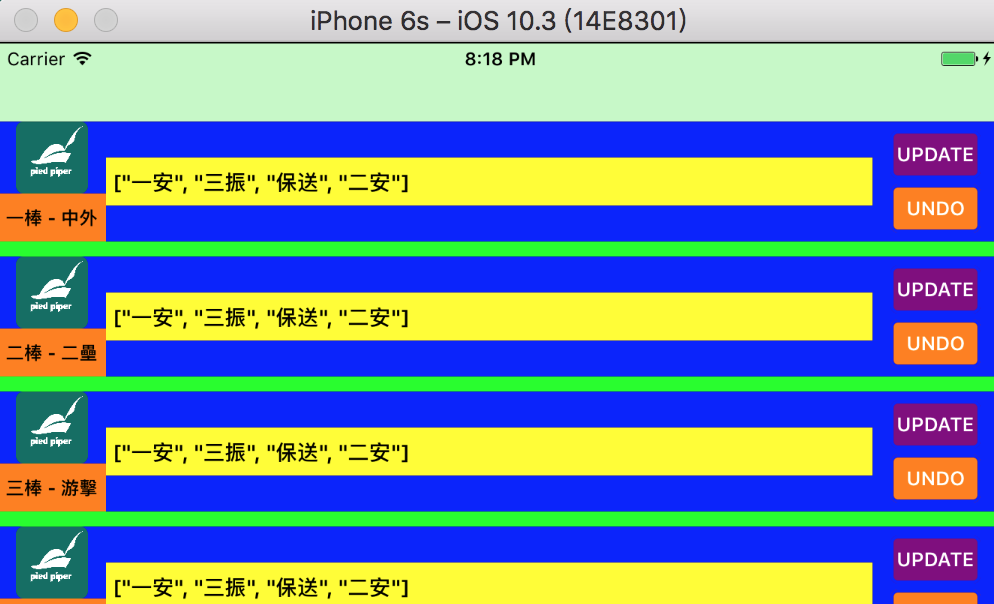
就修改一下Anchor跟新增button
lazy
var
UIButton
=
    let
=
UIButton
    button.translatesAutoresizingMaskIntoConstraints =
false
    button.backgroundColor =
    button.layer.cornerRadius =
5
    button.layer.borderColor =
UIColor
    button.layer.borderWidth =
2
    button.setTitle("UNDO"
    button.titleLabel?
=
UIFont
13
    return
}()

func
setupView
    backgroundColor =
    addSubview(profileImage)
    addSubview(recordText)
    addSubview(sentButton)
    addSubview(undoButton)
    addSubview(orderLabel)

    profileImage.topAnchor.constraint(equalTo: self
=
true
    profileImage.leftAnchor.constraint(equalTo: self
12
=
true
    profileImage.heightAnchor.constraint(equalToConstant: 48
=
true
    profileImage.widthAnchor.constraint(equalToConstant: 48
=
true

    sentButton.centerYAnchor.constraint(equalTo: self
-
18
=
true
    sentButton.rightAnchor.constraint(equalTo: self
-
12
=
true
    sentButton.widthAnchor.constraint(equalToConstant: 60
=
true
    sentButton.heightAnchor.constraint(equalToConstant: 32
=
true

    undoButton.centerYAnchor.constraint(equalTo: self
18
=
true
    undoButton.rightAnchor.constraint(equalTo: self
-
12
=
true
    undoButton.widthAnchor.constraint(equalToConstant: 60
=
true
    undoButton.heightAnchor.constraint(equalToConstant: 32
=
true

    recordText.leftAnchor.constraint(equalTo: profileImage.rightAnchor, constant: 12
=
true
    recordText.rightAnchor.constraint(equalTo: sentButton.leftAnchor, constant: -
12
=
true
    recordText.centerYAnchor.constraint(equalTo: self
=
true
    recordText.heightAnchor.constraint(equalToConstant: 32
=
true

    orderLabel.topAnchor.constraint(equalTo: profileImage.bottomAnchor).isActive =
true
    orderLabel.bottomAnchor.constraint(equalTo: self
=
true
    orderLabel.leftAnchor.constraint(equalTo: self
=
true
    orderLabel.rightAnchor.constraint(equalTo: recordText.leftAnchor).isActive =
true
}
再回到RecordController.swift增加取消的動作undoRecord
如果點擊的那一行有資料(recordArray(row)!= 0),就把對應對應的players資料的最後一個資料刪除
override
func
collectionView
_
collectionView
UICollectionView
cellForItemAt
indexPath
IndexPath
UICollectionViewCell
    let
=
as?
RecordCell
    let
=
    cell?
=
    cell?
=
    cell?
=
    cell?
self
#selector
    cell?
self
#selector
    cell?
=
    cell?
=
+
" - "
+
    cell?
=
String
    return
!
}

func
sentRecord
sender
UIButton
    let
=
RecordPickerController
    controller.rowInRecordArray =
    present(controller, animated: true
nil
}

func
uudoRecord
sender
UIButton
    print
"Hit Button\(sender.tag)
    switch
    case
0
        if
>
0
            players[0
-
1
            recordArray0.remove(at: recordArray0.count -
1
        }
    case
1
        if
>
0
            players[1
-
1
            recordArray1.remove(at: recordArray1.count -
1
        }
    case
2
        if
>
0
            players[2
-
1
            recordArray2.remove(at: recordArray2.count -
1
        }
    case
3
        if
>
0
            players[3
-
1
            recordArray3.remove(at: recordArray3.count -
1
        }
    case
4
        if
>
0
            players[4
-
1
            recordArray4.remove(at: recordArray4.count -
1
        }
    case
5
        if
>
0
            players[5
-
1
            recordArray5.remove(at: recordArray5.count -
1
        }
    case
6
        if
>
0
            players[6
-
1
            recordArray6.remove(at: recordArray6.count -
1
        }
    case
7
        if
>
0
            players[7
-
1
            recordArray7.remove(at: recordArray7.count -
1
        }
    case
8
        if
>
0
            players[8
-
1
            recordArray8.remove(at: recordArray8.count -
1
        }
    default
        return
    }
    DispatchQueue
        self
?
    }

}
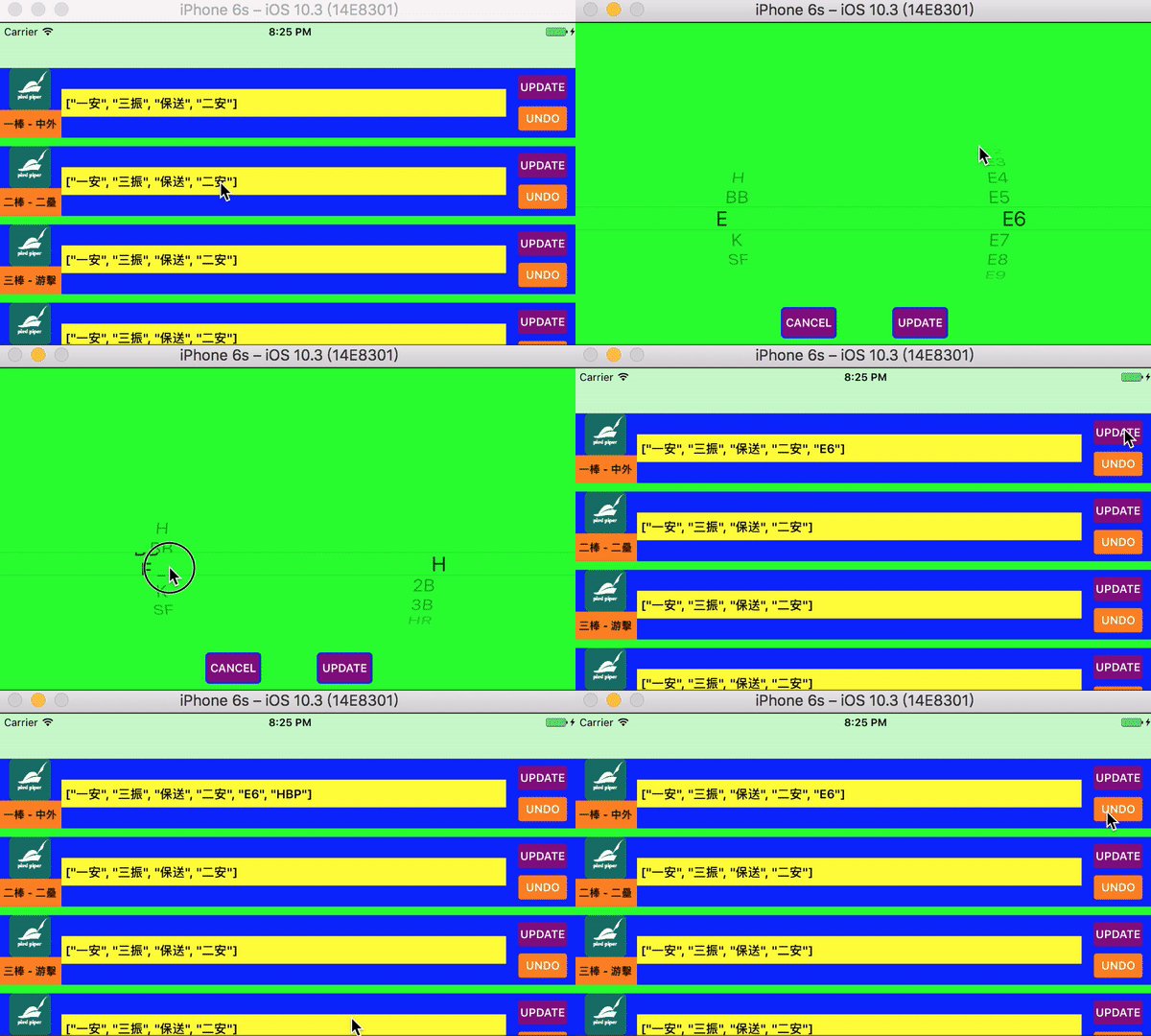
執行一下看結果