Swift隨手紀錄Day23-利用Breakpoint進行Autolayout除錯
防止偷懶Day23 昨天在處理畫面元件移動的anchor的時候 沒有處理乾淨,所以執行時會出現一些問題 所以這篇就來處理一下,順便記錄一下該如何利用Breakpoint來進行Autolayout的除錯
防止偷懶Day23
昨天在處理畫面元件移動的anchor的時候
沒有處理乾淨,所以執行時會出現一些問題
所以這篇就來處理一下,順便記錄一下該如何利用Breakpoint來進行Autolayout的除錯
首先就來看看發生了什麼事
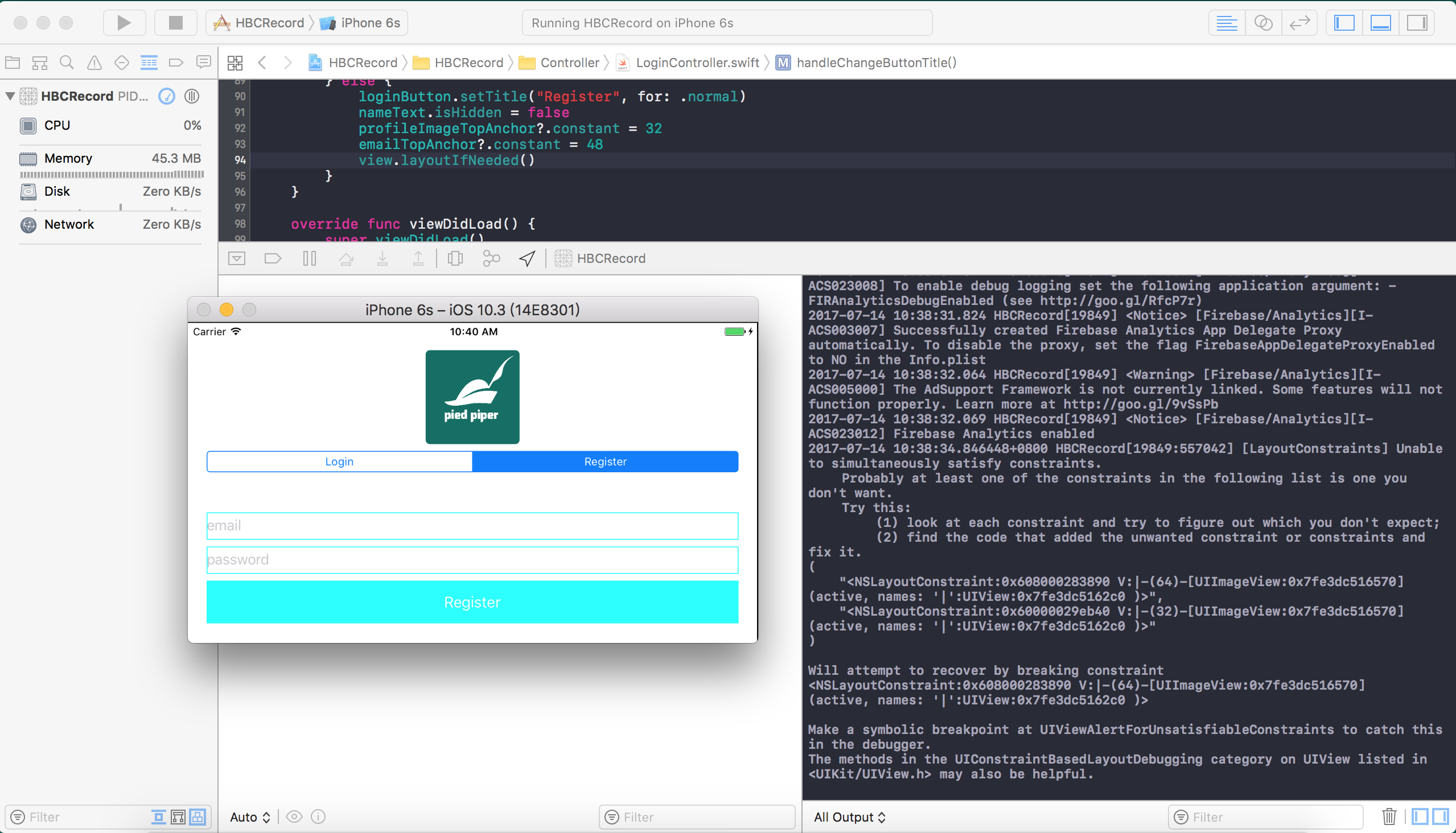
右下的console可以看到,應該是設定畫面的anchor時出現了一些問題
看敘述應該是重復的anchor造成其中一個沒作用
所以Xcode在console跳出了警告
雖然到這邊大該需要的資訊應該都有了
不過還是記錄一下要怎麼設定Breakpoint來看更多的資訊
首先就來設定一下Breakpoint,讓Xcode在發現UI設定上錯誤時除了在console顯示之外
還可以幫我們把需要的資訊印出來
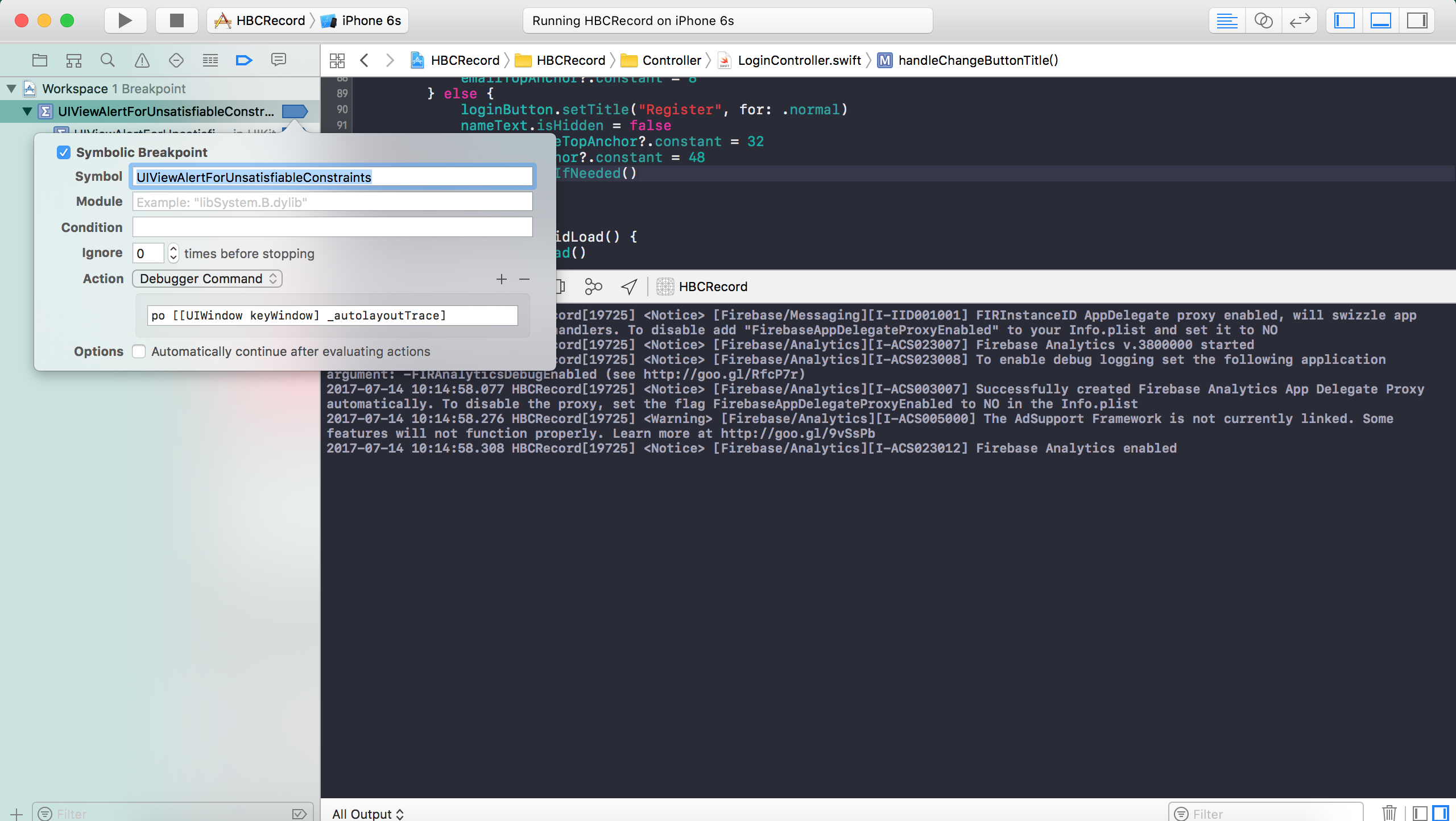
從左邊的Navigator選擇Breakpoint那一欄
然後點擊左下的+號
選擇Symbolic Breakpoint…
設定Symbol為UIViewAlertForUnsatisfiableConstraints
然後點擊Add Action輸入po [[UIWindow keyWindow] _autolayoutTrace]
然後執行APP,在UI出現問題的地方就會停下來給出這個畫面整個UIWindow的資訊
這個資訊在元件的後方都有一串編碼
這編碼就代表了這個元件
在除錯時還可以把指定的元件變色來確定元件位置
如同圖片裡所顯示,在斷點時進入console輸入
expr ((UIView *)0x7f84fa419500).backgroundColor = [UIColor redColor]
就可以將指定的畫面在繼續執行APP時變成指定的顏色
最後既然知道是anchor有重複,那就來修改一下anchor吧
順便把繼承來的nameTtext加回去
就來看下修改後的程式碼吧
import
import

class
LoginController
AddMemberController

    var
NSLayoutConstraint
    var
NSLayoutConstraint

    let
UISegmentedControl
=
        let
=
UISegmentedControl
"Login"
"Register"
        sc.selectedSegmentIndex =
0
        sc.translatesAutoresizingMaskIntoConstraints =
false
        sc.addTarget(self
#selector
        return
    }()

    let
UITextField
=
        let
=
UITextField
        text.placeholder =
"email"
        text.translatesAutoresizingMaskIntoConstraints =
false
        text.layer.borderColor =
UIColor
        text.layer.borderWidth =
1
        return
    }()

    let
UITextField
=
        let
=
UITextField
        text.placeholder =
"password"
        text.translatesAutoresizingMaskIntoConstraints =
false
        text.isSecureTextEntry =
true
        text.layer.borderColor =
UIColor
        text.layer.borderWidth =
1
        return
    }()

    lazy
var
UIButton
=
        let
=
UIButton
        button.translatesAutoresizingMaskIntoConstraints =
false
        button.setTitle("Login"
        button.backgroundColor =
        button.addTarget(self
#selector
        return
    }()

    func
handleRegister
        guard
let
=
let
=
else
            print
"Input Error"
            return
        }

        FIRAuth
?
FIRUser
in

            if
!=
nil
                print
!
                return
            }

            let
=
FIRDatabase
"https://hbcrecord-5a3d4.firebaseio.com/"
            let
=
"User"
            let
=
"email"
            userReference.updateChildValues(accountValue, withCompletionBlock: { (err, ref) in

                if
!=
nil
                    print
!
                    return
                }

                print
"New user saved success"

            })

        })
    }

    func
handleChangeButtonTitle
        if
==
0
            loginButton.setTitle("Login"
            nameText.isHidden =
true
            profileImageTopAnchor?
=
64
            emailTopAnchor?
=
8
        } else
            loginButton.setTitle("Register"
            nameText.isHidden =
false
            profileImageTopAnchor?
=
32
            emailTopAnchor?
=
48
            view.layoutIfNeeded()
        }
    }

    override
func
viewDidLoad
        super

        profileImage.removeFromSuperview()
        profileImage.removeConstraints(profileImage.constraints)
        positionSegmentedControl.removeFromSuperview()
        nameText.removeFromSuperview()
        registerButton.removeFromSuperview()

        view.addSubview(profileImage)
        view.addSubview(loginSegmentedControl)
        view.addSubview(nameText)
        view.addSubview(emailText)
        view.addSubview(passwordText)
        view.addSubview(loginButton)
        nameText.isHidden =
true

        profileImageTopAnchor =
64
        profileImageTopAnchor?
=
true
        profileImage.centerXAnchor.constraint(equalTo: view.centerXAnchor).isActive =
true
        profileImage.heightAnchor.constraint(equalToConstant: 110
=
true
        profileImage.widthAnchor.constraint(equalToConstant: 110
=
true

        loginSegmentedControl.topAnchor.constraint(equalTo: profileImage.bottomAnchor, constant: 8
=
true
        loginSegmentedControl.leftAnchor.constraint(equalTo: view.leftAnchor, constant: 22
=
true
        loginSegmentedControl.rightAnchor.constraint(equalTo: view.rightAnchor, constant: -
22
=
true
        loginSegmentedControl.heightAnchor.constraint(equalToConstant: 24
=
true

        nameText.topAnchor.constraint(equalTo: loginSegmentedControl.bottomAnchor, constant: 8
=
true
        nameText.leftAnchor.constraint(equalTo: view.leftAnchor, constant: 22
=
true
        nameText.rightAnchor.constraint(equalTo: view.rightAnchor, constant: -
22
=
true


        emailTopAnchor =
8
        emailTopAnchor?
=
true
        emailText.leftAnchor.constraint(equalTo: view.leftAnchor, constant: 22
=
true
        emailText.rightAnchor.constraint(equalTo: view.rightAnchor, constant: -
22
=
true
        emailText.heightAnchor.constraint(equalToConstant: 32
=
true

        passwordText.topAnchor.constraint(equalTo: emailText.bottomAnchor, constant: 8
=
true
        passwordText.leftAnchor.constraint(equalTo: view.leftAnchor, constant: 22
=
true
        passwordText.rightAnchor.constraint(equalTo: view.rightAnchor, constant: -
22
=
true
        passwordText.heightAnchor.constraint(equalToConstant: 32
=
true

        loginButton.topAnchor.constraint(equalTo: passwordText.bottomAnchor, constant: 8
=
true
        loginButton.leftAnchor.constraint(equalTo: view.leftAnchor, constant: 22
=
true
        loginButton.rightAnchor.constraint(equalTo: view.rightAnchor, constant: -
22
=
true
        loginButton.heightAnchor.constraint(equalToConstant: 50
=
true

    }

}
昨天只靠移除constraint似乎是沒有辦法解決重複的問題
而且嘗試了幾組設定,問題應該都出在繼承過來的元件
所以試著把這些元件先移除再加回來
目前就沒有再發生constraint重複的問題了
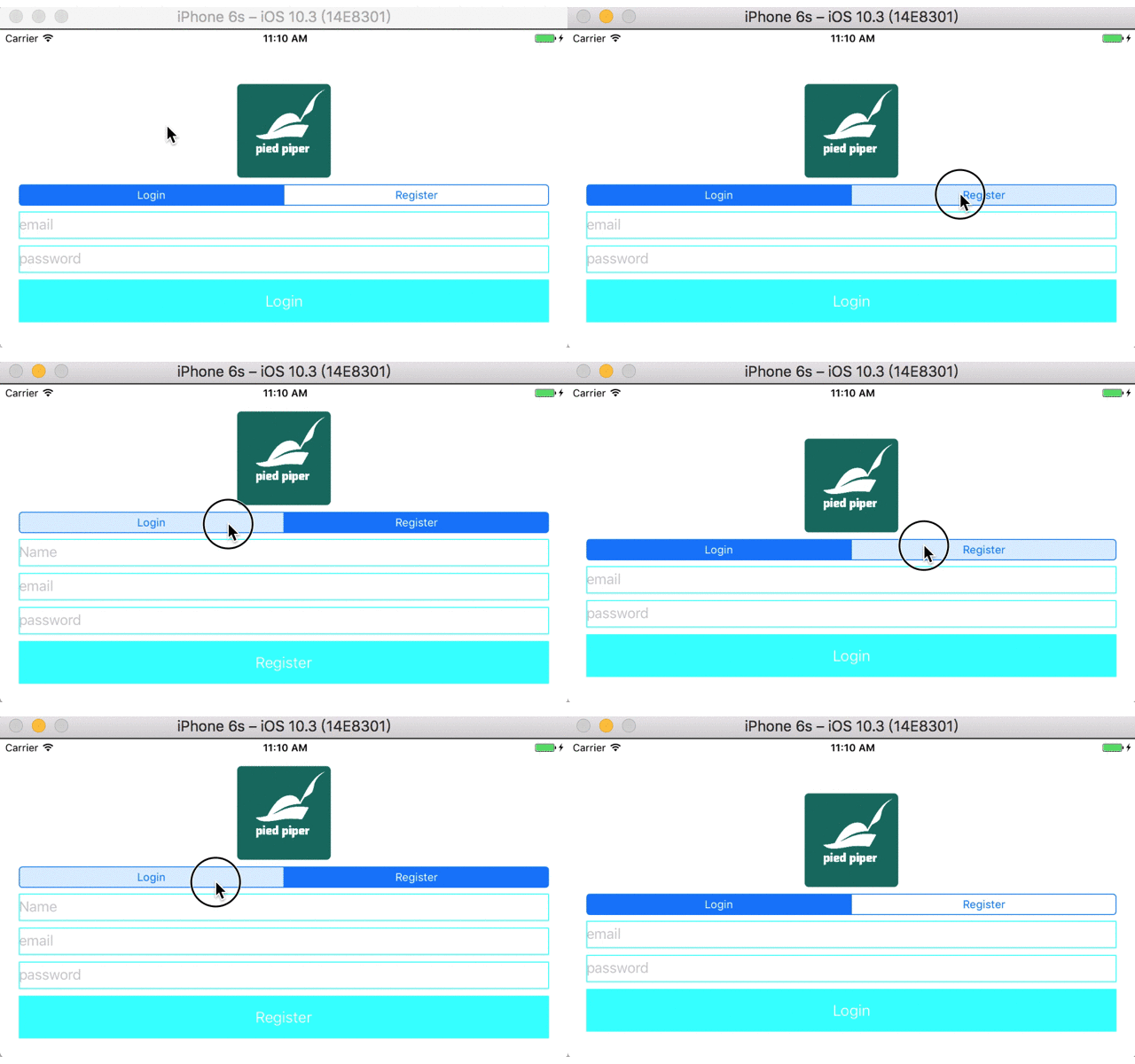
所以再回來看看修改完的UI吧