Swift隨手紀錄Day6-UI調整
Darren
Swift
防止偷懶日記Day6 今天來稍微調整一下UI 接續昨天的畫面,今天稍微修改一下 大概長這樣
防止偷懶日記Day6
今天來稍微調整一下UI
接續昨天的畫面,今天稍微修改一下
大概長這樣
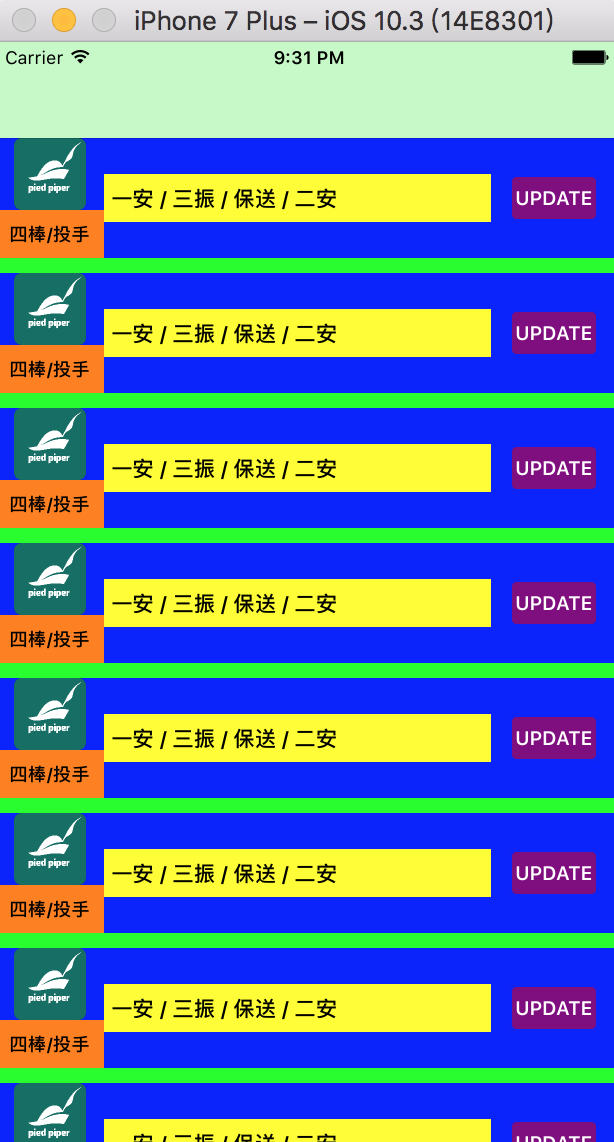
首先是將原來的UILabel換成UITextView
然後是新增一個UILabel來顯示棒次跟守備位置
let
UILabel
=
    let
=
UILabel
    label.translatesAutoresizingMaskIntoConstraints =
false
    label.backgroundColor =
    label.font =
UIFont
12
    label.textAlignment =
    label.text =
"四棒/投手"
    return
}()

let
UITextView
=
    let
=
UITextView
    text.textAlignment =
    text.text =
"一安 / 三振 / 保送 / 二安"
    text.font =
UIFont
14
    text.backgroundColor =
    text.isScrollEnabled =
false
    text.translatesAutoresizingMaskIntoConstraints =
false
    return
}()
上面分別是新增的棒次label跟用來取代昨天中間label的textView
再來是修改一下button的設定讓點擊可以作用
lazy
var
UIButton
=
    let
=
UIButton
    button.translatesAutoresizingMaskIntoConstraints =
false
    button.backgroundColor =
    button.layer.cornerRadius =
5
    button.layer.borderColor =
UIColor
    button.layer.borderWidth =
2
    button.setTitle("UPDATE"
    button.titleLabel?
=
UIFont
13
    button.addTarget(self
#selector
    return
}()
將let改成lazy var,不這樣改動後面新增的addTarget不會觸發,原因在另外找時間寫一篇來討論
接下來調整一下layout的setupView()
func
setupView
    backgroundColor =
    addSubview(profileImage)
    addSubview(recordText)
    addSubview(sentButton)
    addSubview(orderLabel)

    profileImage.topAnchor.constraint(equalTo: self
=
true
    profileImage.leftAnchor.constraint(equalTo: self
12
=
true
    profileImage.heightAnchor.constraint(equalToConstant: 48
=
true
    profileImage.widthAnchor.constraint(equalToConstant: 48
=
true

    sentButton.centerYAnchor.constraint(equalTo: self
=
true
    sentButton.rightAnchor.constraint(equalTo: self
-
12
=
true
    sentButton.widthAnchor.constraint(equalToConstant: 60
=
true
    sentButton.heightAnchor.constraint(equalToConstant: 32
=
true

    recordText.leftAnchor.constraint(equalTo: profileImage.rightAnchor, constant: 12
=
true
    recordText.rightAnchor.constraint(equalTo: sentButton.leftAnchor, constant: -
12
=
true
    recordText.centerYAnchor.constraint(equalTo: self
=
true
    recordText.heightAnchor.constraint(equalToConstant: 32
=
true

    orderLabel.topAnchor.constraint(equalTo: profileImage.bottomAnchor).isActive =
true
    orderLabel.bottomAnchor.constraint(equalTo: self
=
true
    orderLabel.leftAnchor.constraint(equalTo: self
=
true
    orderLabel.rightAnchor.constraint(equalTo: recordText.leftAnchor).isActive =
true
}
最後新增一個functionsentRecord()來描述button被點擊時的動作,先讓console印出點字串來確認按鈕有作用
func
sentRecord
    print
"Hit Button"
}